javascript.info Notes - Arrays
Array initiation
let arr = new Array(); //almost rarely used
let arr = []; // this is what we do

//special case
let arr = new Array(10); //creates an array of ten elements
length of array
let arr = ['a', 'b', 'c'];
let length = arr.length;
console.log(length); //3
//to remove elements from the end, we can change this property
arr.length = 2
console.log(arr); // ['a', 'b'];

arr.length = 0;
console.log(arr); // [];
Accessing array elements
let arr = ['a', 'b', 'c'];

// the first character
console.log( arr[0] ); // a
console.log( arr.at(0) ); // a

// the last character
console.log( arr[-1] ); //doesn't work, undefined
console.log( arr[arr.length - 1] ); // hack, works but ugly
console.log( arr.at(-1) ); // the right way to do it
Looping on an array
let arr = ["Apple", "Orange", "Pear"];

//classic, you get the index as well
for (let i = 0; i < arr.length; i++) {
  console.log( arr[i] );
}

// relatively new, but we don't get the index
for (let fruit of fruits) {
  console.log( fruit );
}
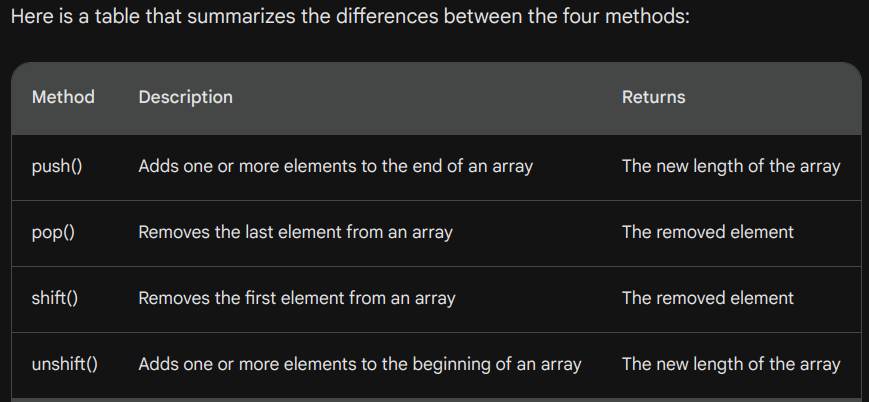
Methods: pop/push, shift/unshift
let arr = ['a', 'b', 'c']

arr.pop();
// remove element from the end, and returns it as well

arr.push('d', 'e', 'f');
// adds element to the end, can add more than one

//following two are relatively slow because
arr.shift();
//removes element at the start and returns it.

arr.unshift('x', 'y', 'z');
//add element at the start, can have several arguemnts
.slice()
The built-in slice method in JavaScript is used to extract a portion of an array without modifying the original array. It returns a new array containing elements from the specified start to end index (excluding the end index). It's a non-mutating method, meaning it doesn't modify the original array.
//Syntax
let newArray = array.slice(start, end);
//start: inclusive, Optional. default: 0
//end: exclusive, Optional. default: length of the array.

//Example
let array = [1, 2, 3, 4, 5, 6, 7, 8, 9, 10]
let sliced = array.slice(-3); //slice from the third last element
//it takes negative arguments as well

let copy = array.slice();
//we can create a copy of any array by using slice without any arguments
.splice()
The splice method is a versatile and powerful array method in JavaScript that allows you to modify the contents of an array by removing or replacing existing elements and/or adding new elements.
let removedElements = array.splice(start, deleteCount, item1, item2, ...);
// start: The index at which to start changing the array. if empty, nothing happens
// deleteCount: The number of elements to remove. optional.
// item1, item2, ...: Elements to add to the array. optional
// returns: the elements removed
// it accepts negative indices as well

let array = [1, 2, 3, 4, 5];
let removed = array.splice(1, 2);

console.log(removed); // Output: [2, 3]
console.log(array); // Output: [1, 4, 5]

//we can just insert elements by setting the deleteCount 0
removed = array.splice(2, 0, 6, 7);
console.log(removed); // Output: []

//we can delete, insert and replace together
removedElements = array.splice(1, 2, 6, 7);

//it supports negative indices as well
removedElements = array.splice(-2, 1);

//if deleteCount is undefine, all elements from startIndex is deleted
removedElements = arr.splice(1)
.concat()
.concat() is a very simple and straightforward but a useful array method. It helps us create a new array by joining the elements of several arrays and other types as well. It's a non-mutating method, meaning it doesn't modify the original array.
let array1 = [1, 2, 3]
let array2 = ['a', 'b', 'c']

let concatArray = array1.concat(array2);
console.log(concatArray); // [1, 2, 3, 'a', 'b', 'c']

//another approach
concatArray = [].concat(array1, array2);
console.log(concatArray); // [1, 2, 3, 'a', 'b', 'c']

//but we can give other kind of data as well.
let obj = {name: "Gaurav"};
concatArray = [].concat(array1, array2, obj, 'x', 99)
console.log(concatArray); // [1, 2, 3, 'a', 'b', 'c', {…}, 'x', 99]
.forEach()
it is useful when we have to execute something on each array item.
[].forEach(function(item, index, array) {
  // ... do something with item
});

let array = [1, 2, 3, 4, 5];

array.forEach(function(element, index, array) {
  console.log(element, index, array)
});

//arrow functions work as well
numbers.forEach(number => console.log(number));
indexOf/lastIndexOf and includes
These are method used to search items in an array. No need to remember the syntax. very easy to use, just search the syntax when you need it. includes is useful when we just want to know if the array has some item, while indexOf/lastIndexOf returns the index of the item if found, and -1 if not found.
find and findIndex/findLastIndex
when we are dealing with complex objects and the search condition is somewhat complicated, find method in JavaScript is used to retrieve the first element in an array that satisfies a provided condition. It stops traversing the array once the first matching element is found, and it returns the value of that element. If no element satisfies the condition, it returns undefined.
//basic syntax
array.find(callback(element, index, array), thisArg);

let users = [
  { id: 1, name: 'Alice' },
  { id: 2, name: 'Bob' },
  { id: 3, name: 'Charlie' }
];

let user = users.find(u => u.id === 2);
console.log(user); // Output: { id: 2, name: 'Bob' }
filter
The .filter() method in JavaScript is used to create a new array with all elements that pass a provided condition. It doesn't modify the original array; instead, it returns a new array containing only the elements that satisfy the specified condition.
//basic syntax
array.filter(callback(element, index, array), thisArg);

let numbers = [10, 20, 30, 40, 50];

let filteredNumbers = numbers.filter(function(element) {
  return element > 30;
});

console.log(filteredNumbers); // Output: [40, 50]

//another example
let users = [
  { id: 1, name: 'Alice', age: 25 },
  { id: 2, name: 'Bob', age: 30 },
  { id: 3, name: 'Charlie', age: 22 }
];

let filteredUsers = users.filter(user => user.age > 25);
console.log(filteredUsers);
// Output: [ { id: 2, name: 'Bob', age: 30 } ]

//next example, filtering even numbers
let numbers = [1, 2, 3, 4, 5, 6, 7, 8, 9, 10];

let evenNumbers = numbers.filter(number => number % 2 === 0);
console.log(evenNumbers); // Output: [2, 4, 6, 8, 10]
map
The map method is one of the most useful and often used. It calls the function for each element of the array and returns the array of results. This method in JavaScript is used to create a new array with the results of calling a provided function on every element in the array. It doesn't modify the original array; instead, it returns a new array containing the results of applying the provided function to each element.
//basic syntax
array.map(callback(element, index, array), thisArg);

//EXAMPLE, create new array with squared numbers
let numbers = [1, 2, 3, 4, 5];

let squaredNumbers = numbers.map(function(element) {
  return element * element;
});

console.log(squaredNumbers); // Output: [1, 4, 9, 16, 25]

//EXAMPLE2, create new array from an array of objects
//with only one key value
let users = [
  { id: 1, name: 'Alice' },
  { id: 2, name: 'Bob' },
  { id: 3, name: 'Charlie' }
];

let userNames = users.map(user => user.name);
console.log(userNames); // Output: ['Alice', 'Bob', 'Charlie']

//EXAMPLE3, DOUBLE THE NUMBERS
let numbers = [1, 2, 3, 4, 5];

let doubledNumbers = numbers.map(number => number * 2);
console.log(doubledNumbers); // Output: [2, 4, 6, 8, 10]
sort(fn)
The sort method in JavaScript is used to sort the elements of an array. By default, it sorts the elements as strings, but you can customize the sorting behavior by providing a compare function. It does not returns the sorted array, but modifies the array.
let fruits = ['banana', 'apple', 'orange', 'grape'];
fruits.sort();

console.log(fruits);
// Output: ['apple', 'banana', 'grape', 'orange']
//works perfectly with strings

// but fails with numbers
let numbers = [5, 22, 8, 11, 7];
numbers.sort();

console.log(numbers);
// Output: [11, 22, 5, 7, 8]
//clearly this is incorrect and it fails as it sorting
// assumes each element to be string but we can fix that.

//To fix it, we need to provide a custom function
//about how to handle the sorting process
function numericCompare(a, b) {
  if (a > b) return 1; // if the first value is greater than the second
  if (a == b) return 0; // if values are equal
  if (a < b) return -1; // if the first value is less than the second
}
numbers.sort(numericCompare);

console.log(numbers); //[5, 7, 8, 11, 22] fixed